Project management in Boord starts where company work already starts: in chat. A leader can describe a launch, sprint, customer project, internal rollout, or operating push, then ask Boord to turn that intent into a project board.
This staging run uses fictional launch work. The point is the workflow: brief the project, let Boord create the structure, then execute with AI Members and human colleagues from the same operating layer.
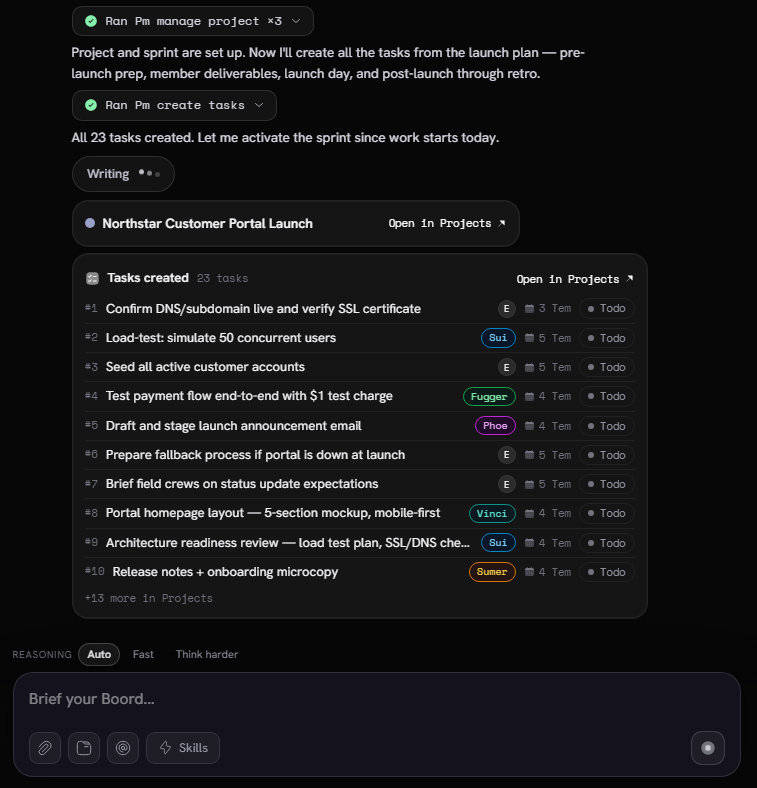
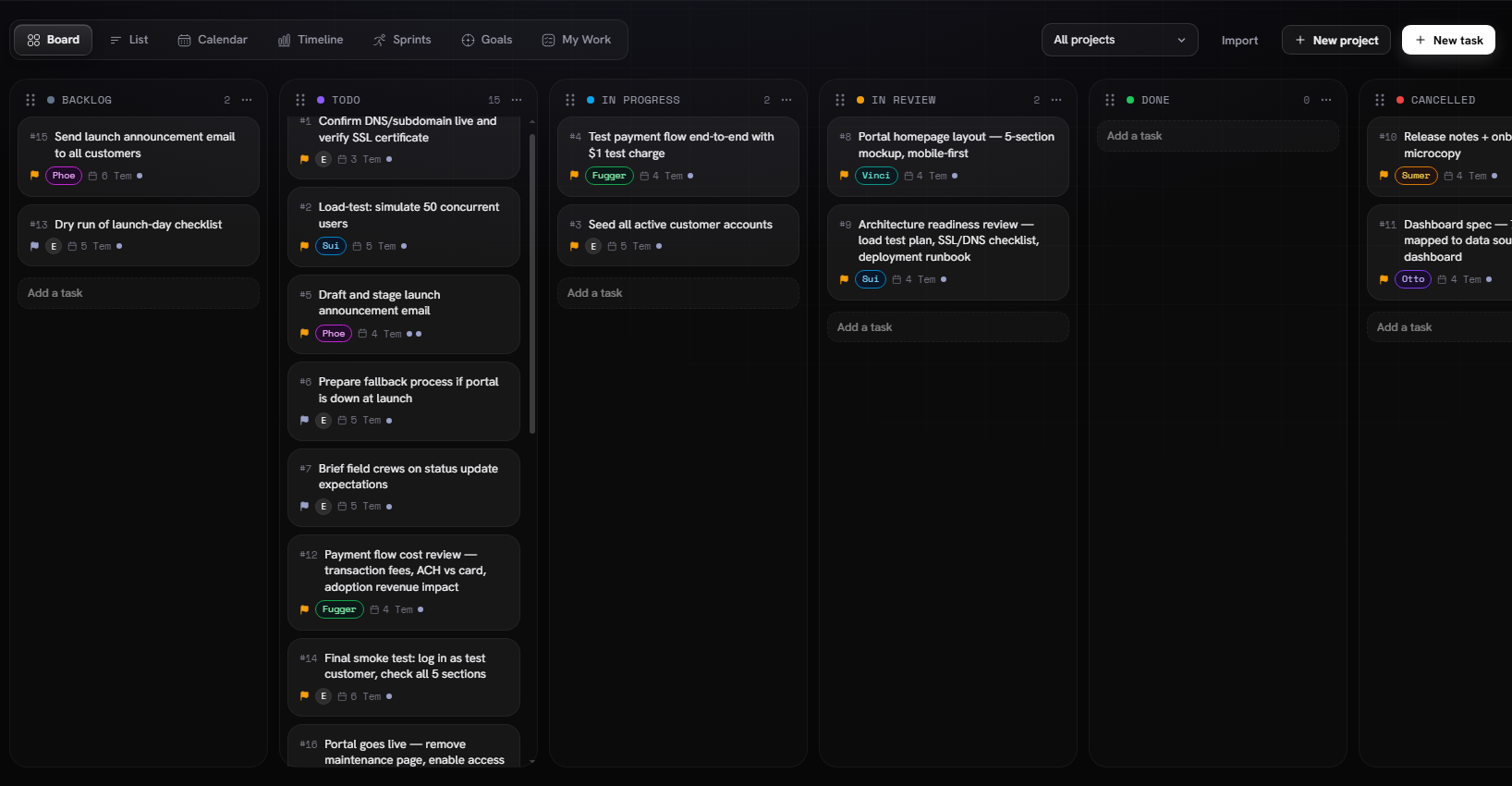
Real app-stage captures from a signed-in workflow using fictional project data. Human review still decides what ships, changes, or gets assigned.
What project management means in Boord
Project management is the shared surface where Boord turns a plan into visible work. The board can hold the project, sprint, tasks, statuses, owners, estimates, Member labels, and review flow.
The difference is that the board is not only manually maintained. A leader can keep asking Boord in chat: create tasks, update the sprint, summarize what changed, find blocked work, prepare a status note, or turn a meeting recap into new project motion.
Plan from chat
Start with a normal brief. Boord can ask clarifying questions, create the project, and make the first sprint plan.
Tasks with owners
Work becomes tasks with statuses, estimates, and Member labels so the board is ready for review.
Member-routed work
Sui, Phoe, Sumer, Vinci, Otto, Fugger, and Roma can each support the parts of the plan that match their role.
Team execution
Human colleagues can review the board, add tasks, move work, and ask Boord to summarize the state of the project.
How to use it
Brief the goal
Tell Boord the project name, the business outcome, the deadline or review moment, and the rough phases of work.
Ask for a project plan
Ask Roma to create the project, define the sprint, and break the plan into tasks that can be reviewed by the team.
Review the generated board
Open the project board, check the task names, owners, Member labels, estimates, and statuses before the team starts executing.
Execute in chat and board
Ask Boord for the next action, a status summary, a risk scan, or a new task. Then move the board as work changes.
Bring colleagues into the loop
Share the board with colleagues so they can review, edit, add context, and ask Boord for project-specific help.
How chat and board work together
The planning interface
Chat is where the team gives intent: what needs to happen, what matters, who is involved, and what Boord should create next.
The execution interface
The project board shows the result: tasks, columns, owners, Member labels, estimates, and review state.
The operating loop
As work changes, chat can summarize the board, create more tasks, turn meetings into updates, or prepare the next team note.
Working with company colleagues
Boord is meant for team work, not private task lists. Colleagues can use the board to see what is planned, what is active, what needs review, and what changed since the last check-in.
The useful pattern is simple: let Boord create the first version, then let people correct reality. A teammate can add missing work, move a task into review, ask for a summary, or tell Boord that a decision changed.
| Team moment | What Boord can do | Human review |
|---|---|---|
| Project kickoff | Create project, sprint, and task structure | Confirm scope and task names |
| Daily execution | Surface blocked or active work | Move tasks and add context |
| Cross-functional work | Route tasks by Member lens | Confirm the real owner |
| Status update | Summarize progress and risks | Approve wording before sending |
| Retrospective | Collect lessons and open questions | Decide what carries forward |
What else you can do
Once a project exists, Boord can connect it to the rest of the company operating layer. A meeting can create project tasks. Brain can preserve the decisions behind the work. Dashboards can explain progress and risk. Follow-up can turn project state into the next message to a customer, team, or stakeholder.
That is the product idea: project management is not a separate admin surface. It is where company memory, specialist Members, and team execution meet.
Use-case FAQ
Can Boord create projects and tasks from a chat plan?
Yes. In this workflow, the user asks Boord to manage the project and create tasks, then Boord turns the plan into a project, sprint, and task board for review.
How do colleagues use the project board after Boord creates it?
Colleagues can open the project board, review tasks, move work through statuses, add new work, and use chat to ask Boord for updates or next steps.
Can Boord work with specialist Members inside project management?
Yes. Tasks can carry Member labels so planning, copy, technical work, design, analysis, and follow-up stay connected to the right specialist lens.