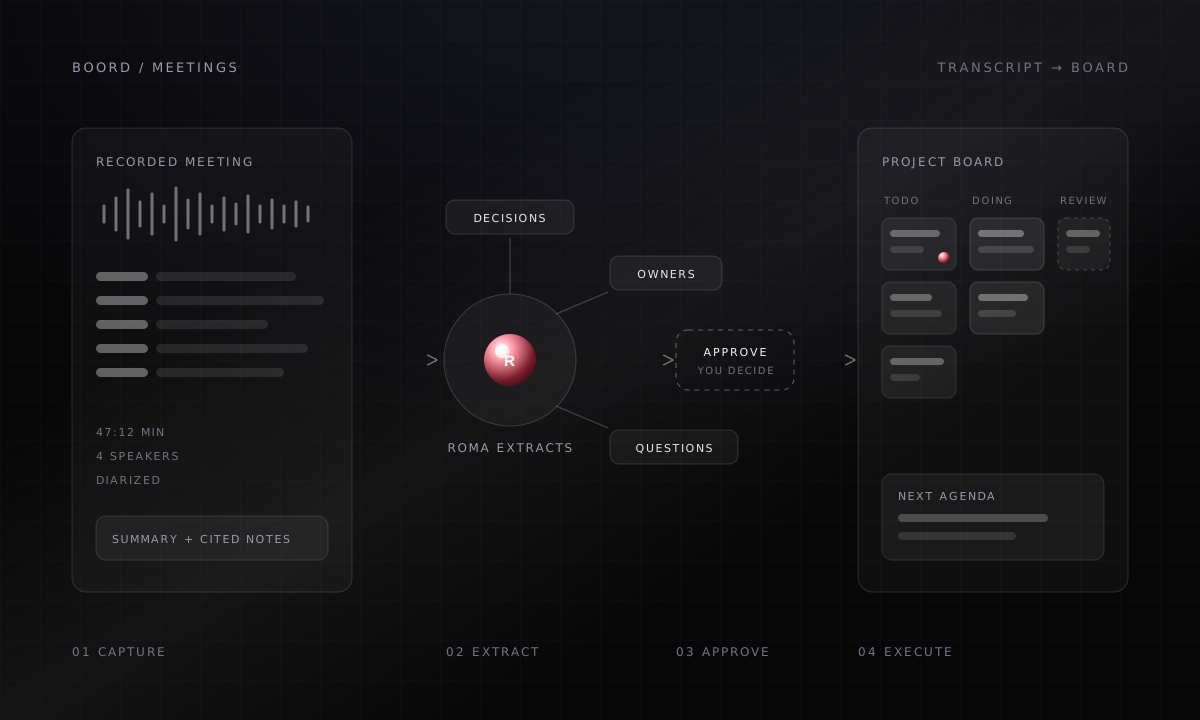
Most meetings produce a recap, and most recaps produce nothing. The decisions live in someone’s memory, the action items live in a message nobody pins, and the next meeting starts by reconstructing the last one.
Boord treats a meeting as raw material for project work. The notetaker captures the call with speakers and timestamps, Roma extracts what the conversation actually produced, and the approved result lands on the same project board your team already works from.
Thursday's roadmap call just ended. Turn it into project work on the Atlas board.
Picked up the recording. Here is what the meeting actually produced, ready for your review.
- Read the transcript and cited notes Done
- Logged 3 decisions and 2 open questions Done
- Create 6 tasks with owners on Atlas Waiting for your approval
Illustrative exchange. Boord proposes the work, and the board only changes after you approve.
What Boord extracts
A meeting hides four kinds of work. Boord separates them so each one can move on its own.
Decision log
What was decided, in wording precise enough to act on, with the person who accepted it. Vague agreements get flagged instead of laundered into certainty.
Owner map
Every piece of work gets a human owner and, where useful, a Member lens: Sui for technical dependencies, Sumer for anything that needs to be written.
Open questions
The questions the meeting raised but did not answer. They open the next agenda instead of disappearing into the recap.
Follow-up draft
A short note for the people who were not in the room: what changed, what is needed from them, and by when. It waits for your edit before it goes anywhere.
The loop, end to end
- Capture
The meeting, recorded
A live call, a transcript, or pasted notes. Speakers stay attributed and every note keeps its timestamp.
- Extract
Signal, not summary
Roma pulls decisions, owners, risks, and open questions. Sumer shapes the follow-up. Sui flags technical dependencies.
Roma Sumer Sui - Approve
You confirm the work
Task creation and outgoing notes wait for a yes. Wrong owner or wrong wording: fix it here, before it lands.
Human decides - Execute
The board moves
Approved work lands where the team already executes.
- Tasks with owners and statuses
- Decision log in company memory
- Next-meeting agenda
- Follow-up note, reviewed
The same loop works from a live recording, an imported transcript, or three messy bullet points.
How to run it
Let the notetaker join
Boord captures the call with diarized speakers, or you paste a transcript or recap afterwards. Either way, the source stays quotable.
Ask for the work inside it
Tell Boord what the meeting was meant to decide. Roma extracts decisions, owners, and questions, and proposes tasks against your real project board.
Correct before you approve
Rename a task, reassign an owner, soften a decision that was not actually final. The proposal is the draft; you are the editor.
Start the next meeting from the residue
Open questions and stalled tasks become the agenda. The meeting after this one begins with what is unresolved, not with a memory test.
The review discipline
Extraction is judgment, so the workflow keeps a human check at every point where the record becomes action.
| Meeting signal | Boord proposes | You confirm |
|---|---|---|
| A decision was made | Decision log entry with owner | The wording and the owner |
| Work was promised | Task on the project board | Scope, assignee, and due date |
| A blocker surfaced | Flagged risk on the affected task | Whether it needs escalation |
| A question stayed open | Item on the next agenda | Who should answer it |
| Someone missed the call | Follow-up note draft | Tone and what to ask for |
Where the memory goes
The decision log does not stop at the board. Decisions, owners, and their context flow into Brain, Boord’s company memory, connected to the project, the people, and the customer they touch.
That is what makes the third meeting on a topic cheaper than the first: you can ask what was decided in May, who pushed back, and what changed since, and get an answer grounded in the transcript instead of in whoever remembers loudest.
Use-case FAQ
What meeting sources can Boord work from?
A recording captured by the Boord notetaker, an imported transcript, a recap, or a few pasted bullet points. Richer sources produce better extraction, but the loop is the same.
Does Boord create tasks without asking?
No. Boord proposes the decision log and task list first. Creating tasks, changing the board, or sending the follow-up note each wait for your approval.
What happens to the open questions nobody answered?
They become the first items on the next meeting's agenda. Boord carries them forward until someone answers or closes them, so questions stop dying in recaps.
Can I ask about old meetings later?
Yes. Meetings stay searchable from chat, so you can ask what was decided about a topic, who owned it, and what changed since, with answers grounded in the transcript.